Twitch Adds Ban/Timeout Reasons
In an effort to improve moderation tools, Twitch has added the ability for moderators to give reasons when timing out or banning bad users. Moderators can ban a user by typing /...
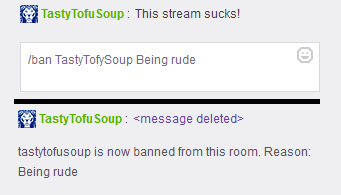
In an effort to improve moderation tools, Twitch has added the ability for moderators to give reasons when timing out or banning bad users. Moderators can ban a user by typing /ban username or timeout a user with /timeout username seconds. To add a reason for why they are being banned or timed out, simply add the text to the end of the command. The ban reason will be visible to all other moderators and the user affected, but not to the rest of chat. This is helpful in keeping all moderators on the same page with what is happening in chat as well as informing the user what they did wrong, so if they return they will be aware of the rules. Unfortunately, manually typing out the command to ban or timeout a user is neither quick nor easy. Moderators typically prefer using the mod icons or the BetterTTV options rather than typing out the command. It's usually preferable to quickly remove a bad message from chat. Nevertheless, this has definitely been a requested feature and can definitely be adapted by some channels.
Written by
Go further
Want a second set of eyes on your stream?
Our consultants have grown channels from a handful of viewers to Partner. Book a 1-on-1 session and get advice specific to your content, your numbers, and your goals.
Meet the consultants